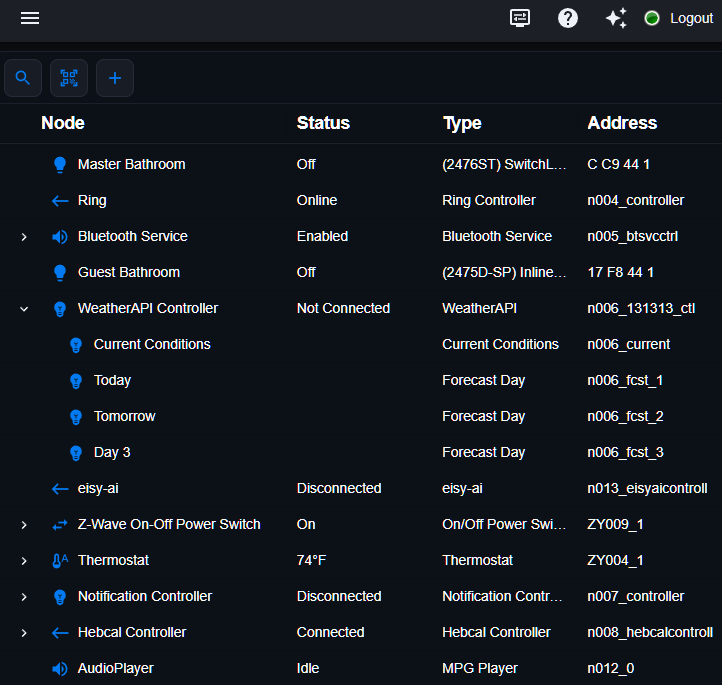
eisy-ui Is Ready. Admin Console Is Dying.
Is eisy-ui Ready?
Yes. eisy-ui now has more than 98% parity with Admin Console. You can add Insteon, Z-Wave, and Zigbee devices, manage scenes, and create new programs or edit existing ones, all from your browser with no Java required. In fact, adding devices has never been easier: just scan a QR code and let eisy figure out how to commission it.
And the gap is only going to widen. Every new feature we add to eisy-ui raises the chance that something in Admin Console breaks. Our development is moving forward in eisy-ui, and Admin Console is staying behind.
What This Means for eisy Users:
What This Means for ISY994 Users:
If you’re actively managing your setup by adding devices, editing programs, or adjusting configurations, this is your signal to upgrade to eisy now, while migration is easy, you have time, and the incentives are good. And if you already have an ISY Portal subscription, your annual fee drops by $15 a year.
Right now, upgrading is as affordable as it’s ever been. Use code BNG9BU7J to save 12% and get 1 free year of ISY Portal, valid through October 23, 2026.
* insteon requires a PLM. To use your existing PLM, you also need the Serial PLM Kit [ link ].
* Z-Wave and Zigbee require supported off-the-shelf dongles [ link].
Upgrading Is eisy!
Whether you choose eisy | home r2 or eisy | lite, migrating from your 994 is straightforward, and now easier than ever.
– What You’ll Need
-
1 × eisy | lite or eisy | home r2
-
1 × Serial PLM Kit — only if you want to use your existing 994 PLM
-
External Z-Wave/Zigbee dongles for Z-Wave and Zigbee support [ link ]
– Simple Instructions
-
For Insteon devices, migration is as simple as a backup and restore.
-
If you’re using a 500 series Z-Wave unit (models with ZW+), migration is just as seamless.
-
Your ISY Portal licenses and Alexa/Google Home configurations transfer with a single click.
-
Extend your system with hundreds of plugins: Click here for the full list
We’ve prepared comprehensive migration instructions to guide you every step of the way: Click here for the full guide.
Thank you for being part of this journey with us. More good things are on the way.

October 16, 2026 @ 6:47 am
Congrats! This will be easier to use. Still hoping you will add the ability to control scenes from Apple HomeKit soon (so far only Insteon devices, no scenes)
October 16, 2026 @ 7:34 am
I don’t see scenes, or any way to create or edit a scene. Is this going to be available??
October 16, 2026 @ 7:42 am
And still no support for managing Z-Wave lock users. I still have to use Admin Console for that. Can’t do it in UD Mobile, either, several years after I requested this.
October 16, 2026 @ 8:09 am
I can view programs but I see no way to edit them or add a new program? Also, insteon scenes are showing up in existing programs as ‘undefined’?
October 16, 2026 @ 8:25 am
@Dennis GG,
Did you upgrade?
October 16, 2026 @ 8:26 am
@C. Quinn,
Did you upgrade?
October 16, 2026 @ 8:27 am
Yes, one of our very very top 3rd party developers is working on it.
October 16, 2026 @ 8:27 am
@Steve Lionel,
Not true. Right Click Node > Configuration.
October 16, 2026 @ 8:41 am
Upgrade to what? Eisy vs Isy994 – yes?
October 16, 2026 @ 8:42 am
Currently using eisy-ui v 0.8.13
October 16, 2026 @ 8:49 am
And thus the issue. You need to upgrade your packages, eisy-ui 1.4.4.
October 16, 2026 @ 9:12 am
And, thus, it says it is not available. How do I upgrade??
October 16, 2026 @ 9:21 am
Please submit a ticket. These posts are not the means of getting support.
October 16, 2026 @ 9:26 am
Thanks.
October 16, 2026 @ 10:36 am
What would be really helpful is a link to a page that tells you where eisy-ui is located and how to access it, for people who have never used it.
October 16, 2026 @ 10:43 am
@CD Tavares,
https://wiki.universal-devices.com/Eisy:User_Guide#eisy-ui
October 16, 2026 @ 12:33 pm
My issue is that the Universal Device (UD) server has to be accessed to logon to my eisy. I’ve been told that the logon is cached in my eisy, which is true until I have a power failure. I run with my eisy blocked from accessing the internet. If I have a power failure I have to enable internet access to logon to my eisy, or I’m dead in the water. This puts us all in the same situation the Insteon users found themselves in when Insteon closed it’s doors. They could not use their Insteon controllers. Thankfully a group of Insteon users got together and brought it back to life. If UD goes under or decides we should pay a nominal fee subscription to use our eisy devices what can we do then?
October 16, 2026 @ 12:38 pm
There aren’t really any upgrade instructions at the wiki link provided (i.e., the EISY-UI portion of the user guide). It was fairly easy and intuitive to do the upgrade By going to System under the menu bar, but there were two things which were not totally intuitive:
1. The length of time it took to complete the upgrade process (about 25 minutes for me); and 2. The fact that you had to upgrade all “Packages” simultaneously. You might want to add some brief upgrade instructions to the wiki and alert the user to those two points.
October 16, 2026 @ 12:38 pm
> My issue is that the Universal Device (UD) server has to be accessed to logon to my eisy.
Not true, except the first time.
> I’ve been told that the logon is cached in my eisy, which is true until I have a power failure.
Not true. It stays cached.
> I run with my eisy blocked from accessing the internet. If I have a power failure I have to enable internet access to logon to my eisy, or I’m dead in the water.
Not true.
October 16, 2026 @ 12:53 pm
All good after upgrade. Thanks and nice job on the web UI.
October 16, 2026 @ 1:30 pm
I ask again, can you create and edit insteon scenes using eisy-ui??
October 16, 2026 @ 1:34 pm
YES YES YES YES x infinity YES … again, if you have problems, SUBMIT A TICKET. All further technical questions will be completely ignored.
October 16, 2026 @ 1:40 pm
Where is the information/link to a document explaining how to edit/create an insteon scene? Hopefully, there won’t be a need for a TICKET.
October 16, 2026 @ 1:45 pm
Good to know that one can edit/create insteon scenes using eisy-ui. Hopefully this doesn’t require a TICKET SUBMISSION – where do I find the documentation explaining how to use eisy-ui to create/edit insteon scenes.
October 16, 2026 @ 1:47 pm
Are you deleting my posts??
October 16, 2026 @ 1:47 pm
No, ignoring them. You are now spamming.
October 16, 2026 @ 1:49 pm
OMG. WOW. Simple question. Not sure why you are ignoring the question. Can’t believe other people don’t have the same question. Please, just answer the question. TIA.
October 18, 2026 @ 5:04 am
Java admin console has been the most stable Insteon platform for as long as I’ve owned my first Insteon switch (a LONG time ago). Now it’s going away in favor of a UI that requires a portal login and is lacking full parity to what it’s replacing. This is a great demonstration of enshittification right here.
October 18, 2026 @ 6:57 am
Learned a new word today …
Well, few falsities in your post:
1. Most stable for you, 60% of support tickets (10% repeat customers and 50% new customers) for us with Java updates, computer updates, VPN, firewall, etc. certificates, no support on OpenWebStart, and the list goes on ..
2. If you read the previous newsletter, the reason we are doing this is because Mac will no longer support Java by the end of the year, and Windows is going to do the same
3. You only need ISY Portal to login THE FIRST TIME
4. We have at least 98% parity with the Admin Console now and it’s going to be 100% by 12/15
And, finally, I know how it feels – alas it’s not possible to make everyone happy. I am so sorry.
With kind regards,
Michel
October 18, 2026 @ 5:37 pm
C. Quinn – Scenes are called Groups in the eisy-ui. On the Nodes screen, click + to add a Group, then you can add insteon devices to the group.
October 19, 2026 @ 10:26 am
@Michel, while I appreciate the recent progress, I noticed that Polisy and Polisy PRO were left out of your “what this means” between the ISY994 and the eisy. It feels like Polisy is facing the same fate as the Java console, especially since we can no longer officially update it to the latest UI.
We may have been spoiled by the impressive longevity of the ISY994 and the Java console. However, because these hubs serve as critical infrastructure for our homes, it isn’t unreasonable to expect a longer lifespan than we would from a standard consumer device like a smartphone. This is especially true when factoring in the required hardware upgrades over the years, such as the three different Z-Wave modules I’ve purchased.
As an early adopter who pre-ordered the Polisy PRO in 2019, I’m feeling some regret; staying on my old ISY994 with Polyglot would have worked just as well. This leaves me with a difficult decision: Should I upgrade to the eisy without knowing its expected lifecycle, or should I invest my time learning Home Assistant to supplement my older hardware?
I want to continue supporting Universal Devices—I’ve happily been a Portal subscriber for a decade—but the hardware lock-in and uncertain product longevity make future investments a tough call.
October 19, 2026 @ 11:16 am
Hi Richard,
Polisy and Polisy PRO are also supported while the OS remains on the 14 branch.
I totally understand the feeling. It’s just PROs/CONs of an embedded device with limited functionality vs. a full-blown OS with unlimited flexibility. So, the more we add, the more resources we need. That’s especially the case with the new generation of AI related tools/services.
Also, if we didn’t have to abandon the Admin Console, all this would be moot: you could have stayed on your existing OS/software for as long as the unit worked.
With kind regards,
Michel
October 19, 2026 @ 3:17 pm
Dennis GG – The information is much appreciated. Thank you!!!
October 24, 2026 @ 8:42 am
Not sure if there’s a dedicated way to submit feature requests for the eisy-ui, but I would love to see buttons on the toolbar to quickly switch between nodes and programs (or other menu options). I find myself switching often. Thanks!
October 24, 2026 @ 7:59 pm
Hi Dennis, thank you very much for the feedback. The best way is to submit : a ticket